

Few things kill momentum on a job faster than a blade snapping mid-cut. One second you’re making progress, the next you’re digging a broken tip out of the material, swapping in a new blade, and hoping it holds up longer than the last one. If this keeps happening, the blade isn’t just unlucky. Something specific is going wrong, and it’s almost always one of a handful of causes.
A blade that snaps once might be a fluke. A blade that keeps snapping, across different jobs or different packs, is telling you something. Oscillating tool blades fail for identifiable reasons: the wrong blade for the material, too much force, too much heat, a low-quality blade to begin with, or a mounting issue that’s putting stress on the blade in a way it wasn’t built to handle.
It’s tempting to just chalk snapped blades up to bad luck or a bad batch and keep buying more of the same blade. But if the same failure keeps happening, replacing the blade without changing anything else just means paying for the same failure again. Walking through the actual causes, one at a time, is what turns “blades keep breaking” into “here’s the specific thing to change.”
This is the single most common reason blades snap, and it’s also the easiest to fix once you know to look for it.
Every blade material is engineered for a specific range of jobs. A bi-metal or standard blade pushed into masonry, tile, or grout is going to fail fast, because it’s fighting an abrasive material it was never designed to cut. A wood-rated blade forced through embedded metal fasteners or thin sheet metal runs into the same problem from the other direction. When a blade meets resistance it’s not built for, it doesn’t cut cleanly, it fights the material. That fight shows up as extra vibration, extra heat, and extra stress concentrated right at the base of the blade near the mount, which is exactly where snapping happens.
The instinct here is usually to buy a separate blade for every material you might encounter. That helps, but it also creates a new problem: the more blades you’re swapping between during a single job, the more chances there are to grab the wrong one, reseat it slightly off, or reach for whatever’s already in the bag instead of what the material actually calls for.
A High-Strength Carbide™ Oscillating Tool Blade is built to handle wood, embedded fasteners, thin metal, plastic, and siding all with the same blade, so you’re not constantly switching between a wood blade and a metal blade and hoping you remembered which one is mounted before you start cutting. Fewer swaps means fewer chances for a mismatched blade, a loose remount, or a rushed cut to be the thing that snaps it.
Grout and tile are really the only case where a dedicated blade still makes sense, since that work calls for diamond grit instead of standard steel. That means reaching for a segment boot blade for general grout work, a straight head for long runs across an open floor, or a finger rasp for tight corners and detail work around fixtures. Outside of that category, one well-matched blade can cover almost everything else on a typical job.
It’s a natural instinct to push harder when a cut is going slow, but with an oscillating tool blade that instinct usually makes things worse, not better.
These blades work by rapid, small side-to-side oscillation, not by brute force. Applying heavy downward or forward pressure doesn’t make the blade cut faster, it flexes the blade beyond what it’s designed to handle. A blade that’s repeatedly flexed under too much pressure eventually fatigues and snaps, often at the worst possible moment mid-cut, sometimes without much warning beforehand.
The fix here is more about technique than equipment. Let the oscillation do the cutting and guide the tool rather than forcing it through the material. If a cut feels like it needs more pressure to move forward, treat that as a signal rather than an obstacle to push past. Most of the time, it’s a sign the blade is wrong for the material, not that the cut needs more muscle behind it. Pushing harder in that moment usually speeds up the eventual snap rather than the cut itself.
Heat is one of the most overlooked causes of blade failure, mostly because the damage isn’t visible until the blade actually breaks.
Every cut generates friction, and friction generates heat. In short bursts that’s not an issue, but sustained cutting without letting the blade cool, especially in dense or abrasive materials, builds heat that weakens the metal at a molecular level. A blade that’s been overheated might look completely fine and then snap on a cut that isn’t even particularly demanding, because the real damage happened several cuts earlier and just hadn’t shown up yet.
This is especially common with grout and tile work, where the temptation is to hold the blade in one spot to grind through a stubborn section rather than working it steadily. That’s exactly the scenario that builds the most heat in the shortest amount of time. Long, uninterrupted cuts through dense material without a break do the same thing, even in materials that aren’t abrasive.
Keeping the blade moving rather than holding it in one place, working in shorter passes rather than one long grinding session, and letting the tool and blade cool between demanding cuts all reduce the heat buildup that leads to sudden, seemingly random failure. None of this requires slowing the job down dramatically, it’s more about working in a steady rhythm than grinding through a tough spot in one uninterrupted push.
Sometimes the blade itself is the problem, not the technique or the material being cut.
Cheaper blades often use thinner steel or lower-grade alloys to hit a lower price point, and that steel simply doesn’t have the fatigue resistance to hold up under repeated flexing and heat cycles. These blades can look identical to a higher-quality blade sitting right next to it on the shelf and still fail dramatically faster once they’re actually put to work.
This is where a lot of the frustration around “cheap blades that keep snapping” actually comes from. It’s not that every inexpensive blade is bad, but there’s a real correlation between price cutting and thinner, lower-grade steel that can’t take the stress of real jobsite use. If you’ve already ruled out material mismatch, technique, and heat, and blades are still snapping at a rate that feels unreasonable, the blade quality itself is worth looking at closely rather than assuming it’s still something you’re doing.
A blade that isn’t seated correctly in the tool, or that doesn’t have a precise fit with the tool’s mounting system, can develop stress points that aren’t obvious just from looking at it.
If the blade sits slightly loose or at a slight angle, the oscillation isn’t distributing force evenly across the blade the way it’s designed to. That uneven stress concentrates in one spot, usually near the base, and that’s where the failure happens. It’s a quiet failure mode, since the blade can look properly attached while still not seating with the precision it needs.
A blade that’s a slightly loose match for your tool’s mount, even if it technically attaches, isn’t getting the same solid, even connection as a blade built for a precise fit. It’s also worth noting that every time you swap blades, you’re introducing another chance for a loose or slightly misaligned remount. Sticking with one well-fitted blade for the majority of your cuts, rather than swapping in and out throughout the day, cuts down on how often that risk comes up in the first place.
If snapping keeps happening at the same point near the base of the blade, that’s a useful clue on its own. It’s worth double-checking that the blade is fully seated, that the mounting mechanism is clean and free of debris, and that it’s actually a proper fit for your specific tool before assuming the blade itself is defective.
Blade snapping is rarely random, even when it feels that way in the moment.
Nine times out of ten, it traces back to one of five things: the wrong blade for the material, too much pressure, too much heat, low-quality steel, or a mounting issue, sometimes more than one of these at once. A lot of these causes compound each other. A mismatched blade generates more heat fighting the wrong material, which weakens it faster, and if that blade also happens to be lower-quality steel to begin with, it’s getting hit from multiple directions at once.
Match the blade to the material, let the oscillation do the work instead of forcing it, manage heat by keeping the blade moving, and start with a blade that’s actually built with fatigue-resistant materials, and most snapping problems disappear. That last point is where blade quality actually pays for itself. A blade engineered to resist fatigue under heat and stress simply survives more of the situations that would snap a thinner, cheaper one. It’s the difference between a blade that fails on the fifth cut of the day and one that’s still going strong on the fiftieth.
A blade built to avoid these failure points generally has a few things in common.
Steel or a diamond coating matched specifically to the material it’s designed for, rather than a one-size-fits-all approach. A precise, secure mounting fit that distributes oscillation force evenly instead of concentrating stress at one point. Manufacturing quality that holds up under sustained heat and repeated flexing instead of fatiguing after a handful of cuts. Any blade missing one of these three is more likely to end up back in this same troubleshooting conversation eventually.
For most day-to-day cutting, the simplest way to apply all of that is to reach for one blade less often, not more. The High-Strength Carbide™ Oscillating Tool Blade is built to handle wood, embedded fasteners, thin metal, plastic, and siding without swapping blades between materials, which removes a big chunk of the mismatch, remount, and mid-job guesswork that leads to snapping in the first place. Keep it mounted for the bulk of your work, and switch over only when you hit grout or tile, where a diamond blade in segment boot, straight head, or finger rasp shape takes over.
Every blade is backed by the WonderBlade™ Guarantee, which covers manufacturer defects and breakage. It’s not a substitute for matching the blade to the material or using good technique, but if a blade does fail from something other than mismatch or misuse, it’s covered rather than being money lost.
A blade that keeps snapping is a symptom, not just bad luck.
Nine times out of ten it traces back to the wrong blade for the material, too much force, too much heat, or a blade that was cutting corners on quality before you ever took it out of the pack.
A lot of that risk comes from constantly switching blades between materials throughout the day, since every swap is another chance for a mismatch or a loose remount. Cutting down on how often you switch, by keeping one blade like the High-Strength Carbide™ Oscillating Tool Blade mounted for the bulk of your work, removes a lot of that risk before it starts. Fix the root cause, match the blade to the job, and a snapped blade becomes the exception instead of something you’re budgeting for on every project.
If “best value” means finishing more work with fewer blades, fewer swaps, and cleaner results, the winner is clear:
➡ WonderBlade™ High-Strength Carbide™ Oscillating Tool Blade
Built for general-purpose, multi-material cutting with the durability and control pros expect—and the versatility DIYers need.
Shop the blade:
https://wonderblade.com/high-strength-carbide-oscillating-blade-1
Learn more about WonderBlade™:
https://wonderblade.com
Watch the comparison video:
https://www.youtube.com/watch?v=b01S7eoalKw
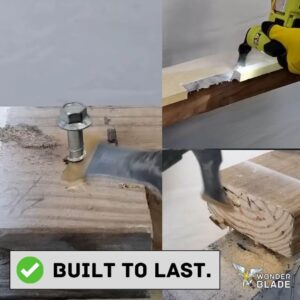
This blade stands out as one of the strongest in its industry due to its High-Strength CarbideTM teeth, known for their exceptional endurance and cutting power, as opposed to ordinary blades, which become dull over time.
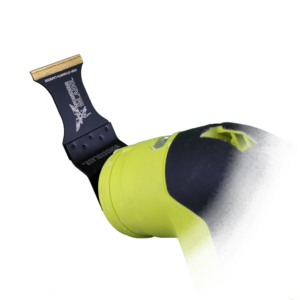
*However, the major issue is that many blades that you’ll find in your local hardware store tend not to last, here at WonderBlade we have an all around General Purpose Oscillating Tool Blade that lasts time and time again against hundreds of cuts through wood, fiber cement, sheetrock, plastic and more*